
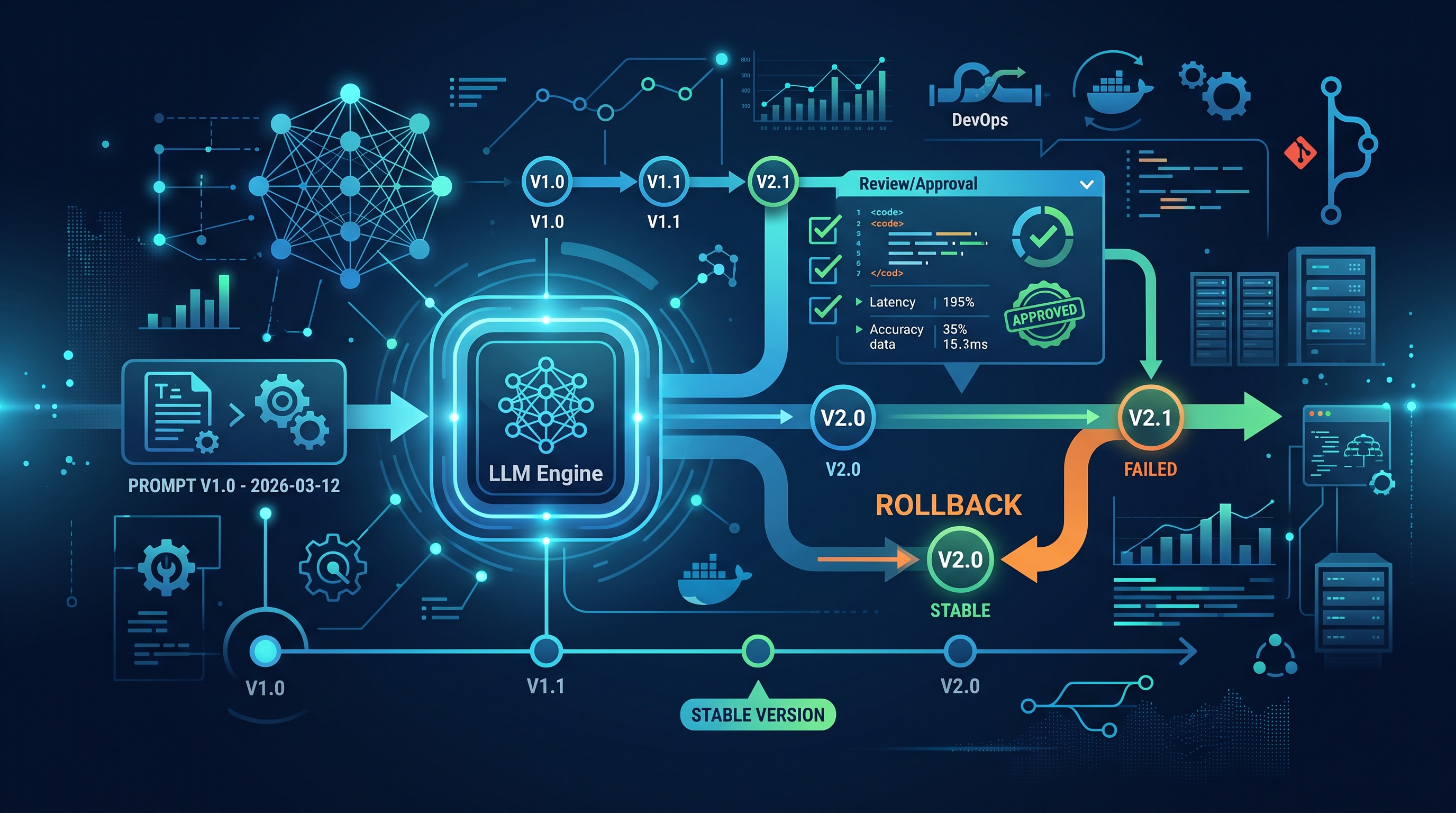
The Illusion of Flexibility in Production LLMs
In 2026, the era of "just tweaking the system prompt in the console" is dead. After two and a half decades in high-frequency trading and enterprise banking infrastructure, I have seen countless systems fail not because the model was wrong, but because the instruction was ambiguous, unversioned, or unreviewed. When you deploy an Agentic AI system to handle financial reconciliation or customer support, the prompt is not just text; it is executable logic. If you treat it like a configuration file that gets edited on the fly, you are inviting supply chain attacks and hallucination cascades.
We need to apply the same rigor we apply to our Java or Go microservices. Every change to a prompt must be tracked, reviewed, and tested. This means implementing a workflow where prompt versioning, review, and rollback are not optional features but mandatory gates in your CI/CD pipeline. The goal is reproducibility: if a model behaves unexpectedly in production, we must know exactly which instruction set triggered it and be able to revert instantly.
Structuring Prompts as Versioned Artifacts
At Gheware Technologies, we advocate for storing prompts in the same repository as your application code, but in a dedicated, structured directory. This allows you to leverage Git’s inherent capabilities for version control. We typically structure prompts using semantic versioning (SemVer) to distinguish between breaking changes and minor updates.
Consider this directory structure for a multi-agent orchestration system:
/prompts/financial/agent-v1.2.0.yaml: Contains the system prompt, few-shot examples, and output schema./prompts/financial/agent-v1.1.0.yaml: The previous stable version, kept for rollback purposes./prompts/financial/evaluations/: Contains test cases and expected outputs for regression testing.
By locking the prompt to a specific commit hash or version tag, you eliminate the "it works on my machine" problem. When you deploy a new version of your agent, you are not just deploying code; you are deploying a specific, immutable version of the instruction set. This is critical for debugging. If latency spikes or accuracy drops, you can correlate the event with a specific prompt version. In my experience, at least 30% of "model performance" issues are actually prompt drift issues.
The Review Gate: Human-in-the-Loop for LLMs
Code reviews are standard in DevOps. Prompt reviews should be too. A prompt review is not just about grammar; it is about security, logic, and compliance. When a developer proposes a change to a prompt, the pull request (PR) must include:
- Change Description: Why is this change necessary? What user story or bug does it address?
- Test Results: Automated evaluation scores from the previous stable version vs. the new version.
- Security Scan: Evidence that the prompt is resistant to injection attacks, as detailed in our guide on prompt injection attacks.
- Compliance Check: Verification that the prompt does not introduce PII leakage or regulatory violations.
This process slows down initial development but accelerates production stability. In enterprise environments, we often require at least two approvals from senior AI engineers before a prompt change reaches production. This ensures that no single developer can introduce a subtle bias or security vulnerability into the core logic. The review process also serves as a knowledge transfer mechanism, ensuring that the team understands the rationale behind each instruction.
Automated Rollback and Incident Response
Even with rigorous review, things go wrong. Models hallucinate, APIs change, or unexpected edge cases emerge. In a traditional web application, you rollback code. In an AI application, you must be able to rollback the prompt. This requires a deployment strategy that supports instant rollback.
We use a canary deployment strategy for prompt updates. When a new prompt version is deployed, it is routed to only 5% of traffic initially. We monitor key metrics:
- Latency: Did the new prompt cause the model to take longer to generate responses?
- Token Usage: Did the prompt inadvertently encourage verbose, token-heavy responses?
- Error Rates: Did the prompt cause the agent to fail in structured output parsing?
- Safety Triggers: Did the prompt trigger any internal safety filters or compliance alerts?
If any of these metrics deviate from the baseline by more than 5%, the system automatically triggers a rollback to the previous stable version. This is not a manual process; it is enforced by the infrastructure. This capability is essential for maintaining trust. If a prompt change causes a customer-facing error, you need to fix it in seconds, not hours. The ability to prompt versioning review rollback 2026 workflows ensures that your AI systems are as resilient as your traditional microservices.
Integrating with Your Existing DevOps Pipeline
Integrating prompt governance into your existing GitOps workflow is straightforward. You can use tools like ArgoCD or Flux to manage the deployment of prompt artifacts alongside your application code. The key is to treat the prompt file as a configuration artifact that is versioned and immutable.
For more on mastering the development side, see our GitHub Copilot mastery guide for 2026, which covers how to leverage AI assistants while maintaining strict code and prompt hygiene. The goal is to create a seamless loop: developers write code and prompts, CI/CD runs tests and reviews, and deployment ensures consistency across environments.
Frequently Asked Questions
How do I handle prompt drift in long-running agents?
Prompt drift occurs when the context window fills up with irrelevant information, causing the agent to lose focus. To mitigate this, implement periodic "context pruning" or "summary" steps in your agent loop. Additionally, version your prompts and rotate them based on usage patterns. If you notice drift, rollback to a previous version and investigate the root cause. Regular evaluation against a golden dataset is essential to detect drift early.
Can I use AI to review prompts automatically?
Yes, but with caution. You can use a smaller, more secure LLM to scan prompts for common vulnerabilities, such as injection patterns or PII leakage. However, this should only be an automated gate, not a replacement for human review. Automated tools can catch syntax errors and obvious security flaws, but they cannot assess the nuanced logic or business context of a prompt. Human expertise is still required for final approval.
What is the best practice for storing prompt versions?
Store prompts in a Git repository alongside your application code. Use semantic versioning (SemVer) to manage changes. Keep all previous versions in the repository for rollback purposes. Do not store prompts in external databases or APIs unless absolutely necessary, as this makes versioning and auditing difficult. Git provides the best balance of version control, audit trails, and collaboration features for prompt management.
How do I measure the success of a prompt change?
Measure success using a combination of automated and manual metrics. Automated metrics include latency, token usage, error rates, and safety triggers. Manual metrics include human evaluation of output quality, accuracy, and tone. A/B testing is also effective: deploy the new prompt to a small subset of users and compare their interactions with the control group. If the new prompt improves key business metrics without introducing negative side effects, it is a success.