
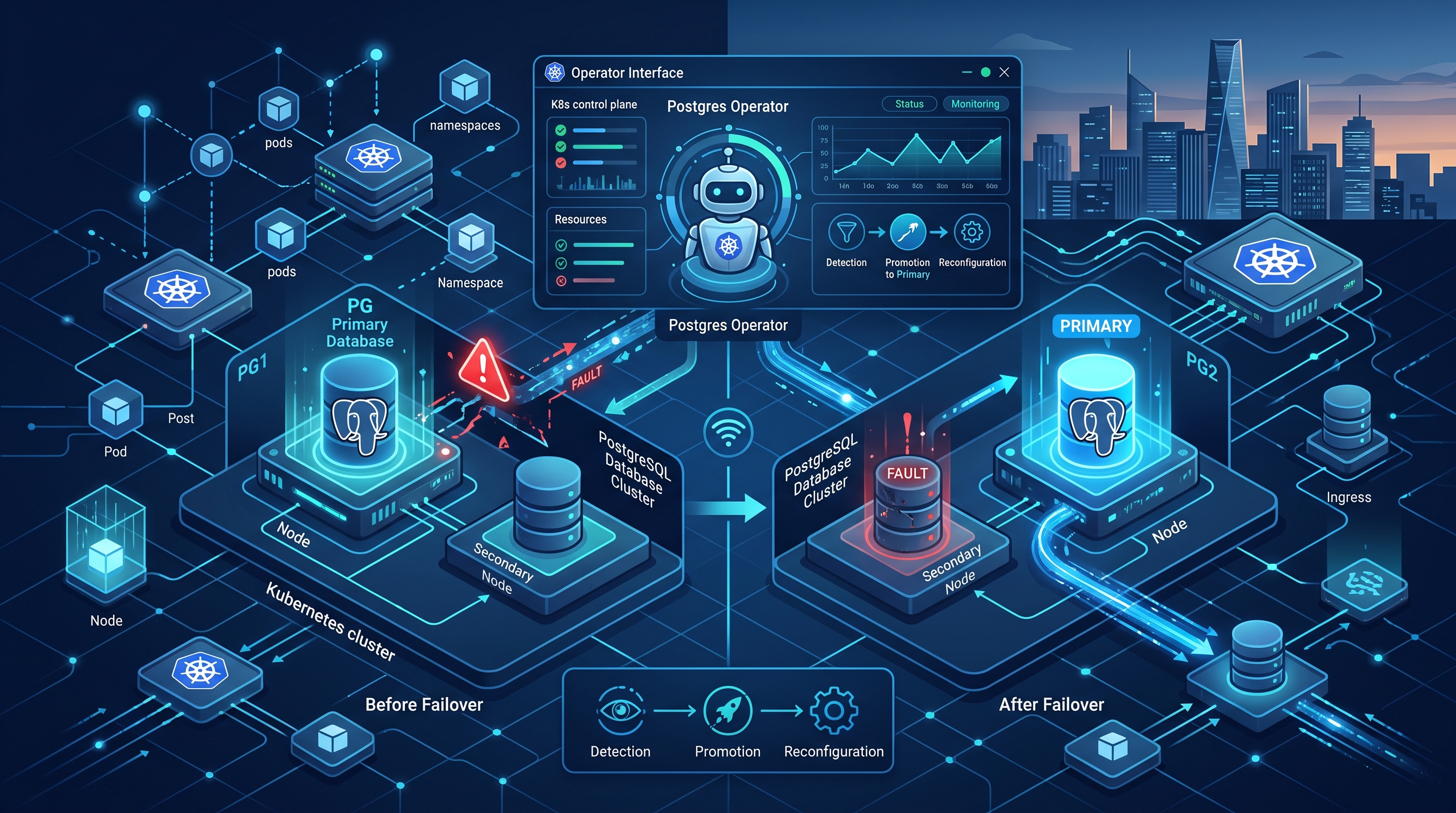
Managing stateful workloads in Kubernetes has historically been a source of sleepless nights for infrastructure teams. PostgreSQL is no exception. In my twenty-five years at institutions like JPMorgan Chase and Morgan Stanley, I’ve seen too many "high availability" claims crumble under the weight of network partitions or operator bugs. Today, we don’t just hope for HA; we engineer it.
By 2026, the landscape has shifted. We are no longer relying on simple Patroni deployments wrapped in bare Helm charts. We are leveraging mature, opinionated operators that enforce best practices, manage backups, and handle failover with surgical precision. If you are still writing custom init containers to manage pg_hba.conf and WAL archiving, you are behind.
The Operator Advantage: Beyond Basic Deployment
A Kubernetes Operator is not just a controller; it is the embodiment of operational knowledge. For PostgreSQL, the operator abstracts the complexity of managing the database lifecycle. It watches the Custom Resource Definition (CRD), ensures the desired state matches the actual state, and handles the tricky bits that kubectl apply cannot.
The primary value proposition is state management. In a standard deployment, if a pod dies, Kubernetes restarts it. But for PostgreSQL, a restart isn’t enough. You need to ensure the new pod knows it’s a replica, it connects to the correct primary, and it synchronizes WALs correctly. Operators like Crunchy Data, Zalando Postgres Operator, or CloudNativePG handle this orchestration automatically.
Consider the difference between manual and operator-managed scaling. A manual horizontal scaling attempt might leave you with two primaries for a few seconds during the transition, causing split-brain data corruption. An operator coordinates with the database to promote a standby before accepting new write traffic, ensuring consistency. This is not magic; it is rigorous state machine logic.
Configuring High Availability and Failover Logic
High availability in PostgreSQL on Kubernetes revolves around Patroni, which manages the etcd or Consul cluster for leader election. The operator sits on top, managing the Patroni pods. When configuring your PostgresCluster or custom resource, you must tune the failover parameters.
The default failover timeout is often too aggressive for production workloads where network latency might spike. I recommend setting the failover_timeout to at least 30 seconds for cross-zone deployments. This prevents unnecessary failovers during minor network hiccups, which can cause more downtime than the actual failure.
apiVersion: postgresql.cnpg.io/v1
kind: PostgresCluster
metadata:
  name: cluster-example
spec:
  instances: 3
  monitoring:
    enableDefaultMetrics: true
  postgresql:
    parameters:
      wal_level: replica
      max_wal_senders: 10
  patroni:
    dynamicConfiguration:
      failover:
        failover_timeout: 30
You must also consider the storage class. Using local SSDs for WAL (Write-Ahead Log) directories can improve IOPS by up to 40% compared to network-attached storage, but it complicates backup strategies. Ensure your operator supports streaming backups to S3 or compatible object storage, which is the industry standard for durability.
Backup Strategies: The Safety Net
A backup strategy is only as good as your restore procedure. I have seen teams spend weeks configuring backups but never test a restore. In 2026, we assume failure is inevitable. Your backup strategy must include:
- Continuous Archiving: WAL files must be streamed to object storage every few seconds. This allows Point-in-Time Recovery (PITR).
- Base Backups: Full database snapshots taken daily or weekly, depending on your Write Amplification Ratio.
- Automated Testing: Schedule a restore to a separate namespace weekly to verify data integrity.
Tools like pgBackRest are often integrated into operators. They handle compression and encryption automatically. If you are not using pgBackRest or a similar tool, you are risking data loss. The time saved in manual backup scripts is negligible compared to the risk of data corruption.
For more on how observability ties into this, read my post on AI-Native Kubernetes Observability. You cannot manage what you cannot measure.
Troubleshooting Common Failover Issues
Even with robust operators, things go wrong. The most common issues I encounter in enterprise environments are:
- Split-Brain Scenarios: This occurs when the etcd cluster is unreachable, and two nodes believe they are primary. This is prevented by quorum settings, but misconfigured network policies can isolate nodes.
- Stuck Promotions: Sometimes, a standby fails to promote. Check the Patroni logs for errors related to connection timeouts or authentication failures.
- Resource Starvation: PostgreSQL is memory-intensive. Ensure your
resources.requestsandlimitsare set correctly. If the OOM killer terminates the primary, the failover process may be delayed.
I also recommend looking into Agentic AI Security in Kubernetes Sandboxing to ensure your database operators are not exposed to unnecessary attack vectors. Security is not an afterthought; it is a core component of reliability.
Frequently Asked Questions
How do I monitor PostgreSQL failover events in Kubernetes? You should integrate Prometheus with your operator. Most operators expose metrics like pg_up and patroni_leader. Set up alerts for changes in the leader status. You can also use custom dashboards in Grafana to visualize failover latency and success rates.
Can I use multiple availability zones with a single PostgreSQL operator? Yes, but you need to configure your Kubernetes cluster with multi-zone support and ensure your storage provider supports cross-zone replication. The operator will distribute replicas across zones, but you must tune the zone labels in your node selectors to ensure true HA.
What is the recommended number of replicas for production? For read-heavy workloads, three replicas are standard. This allows you to lose one node and still have a quorum for leader election and two nodes for read scaling. For write-heavy workloads, consider a single primary with synchronous replication to a standby to ensure zero data loss.
How long does a typical failover take? With proper tuning, failover should take between 10 to 30 seconds. This includes the time for the new primary to start accepting connections and for clients to reconnect. If it takes longer, check your network latency and the health of your etcd cluster.
The future of database management in Kubernetes is not about manual intervention; it is about automated, observable, and resilient systems. By leveraging operators and enforcing strict backup and monitoring policies, you can achieve the reliability that enterprise applications demand. Stop guessing and start engineering.